 Saleva
Guide 2 of 6 · Shop owner
Products, stock counts and knowing what to reorder
Building a catalogue that is quick at the counter, keeping the numbers honest, and letting the app tell you what is about to run out.


Your catalogue is the part of the app everything else leans on. Sales, profit, reordering and your online page all read from it, so it is worth half an hour of care in the first week.
Adding products
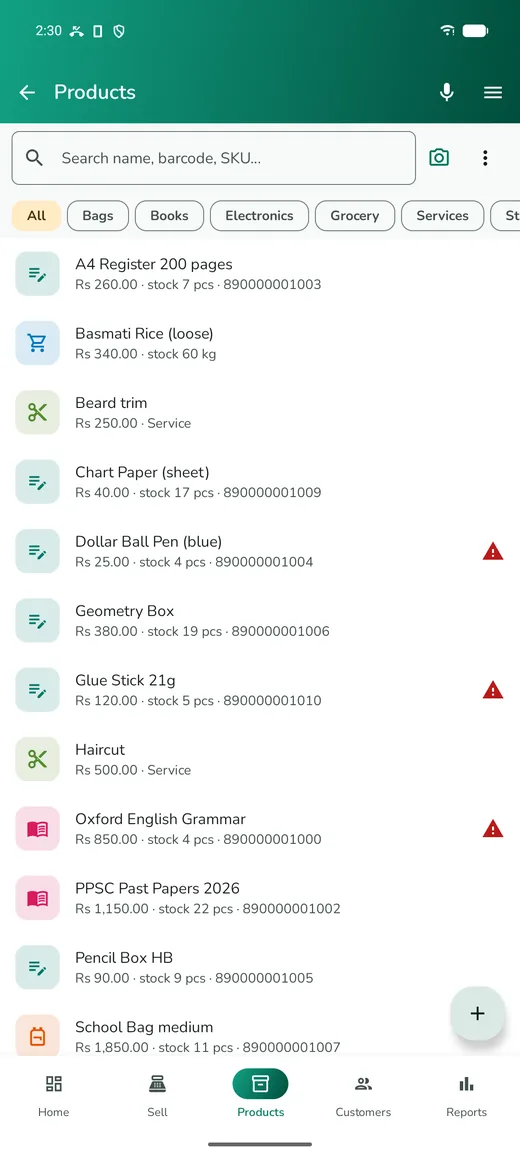
Tap Stock in the bottom bar, then the + button. The form asks for very little: a name and a selling price will do. Three fields are worth filling in properly anyway.
- Name with the size in it. "Cooking Oil 1L", not "Cooking Oil". When you sell several sizes of the same thing, the size in the name is what stops the wrong one being rung up.
- Purchase price. Without what you paid, the app cannot show profit, and profit is the number you actually care about.
- Minimum stock. The level at which you want to be told to reorder, not the level at which you run out. Set it to about one week of sales for your fast movers.
Everything else, from barcode to tax to wholesale price, can stay empty until you need it.
There are three faster ways to build the catalogue than typing:
- Scan as you sell. Scan a barcode the app does not know and it offers to create the product there and then.
- Photograph the product. The camera button on the form reads the barcode, the name, the size and often the price off the packet. Check what it read before saving; it is right most of the time, which is not the same as always.
- Photograph a supplier invoice when receiving stock, and the lines become a draft purchase you confirm.
Keeping the numbers true
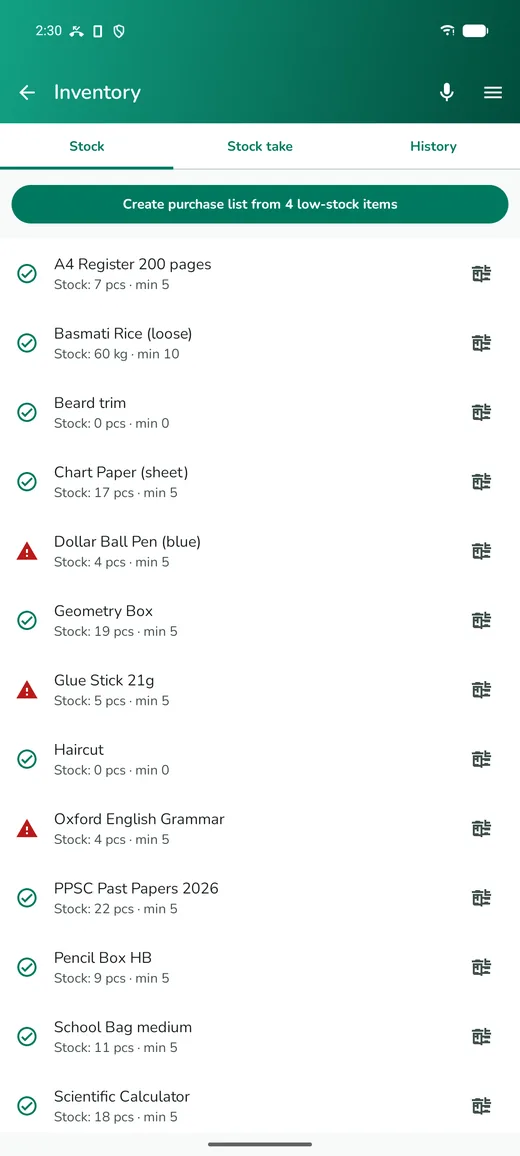
Stock drifts in every shop. Breakages, samples, a sale rung up on the wrong product, a delivery signed for but never entered. The fix is not heroic accuracy, it is small regular counts.
Open Inventory and use a stock take to correct what you find. Count a shelf, enter what is physically there, and the app records the difference as an adjustment so you can see later that it happened.
A routine that survives a busy week: count your top twenty products every Monday morning, and everything else once a quarter. If a number is wrong, fix it, then spend a moment on why — that is what stops it happening again.
Enter deliveries when they arrive rather than later. It takes two minutes and it keeps three things right at once: your stock, your supplier's ledger, and your cost prices.
What is about to run out
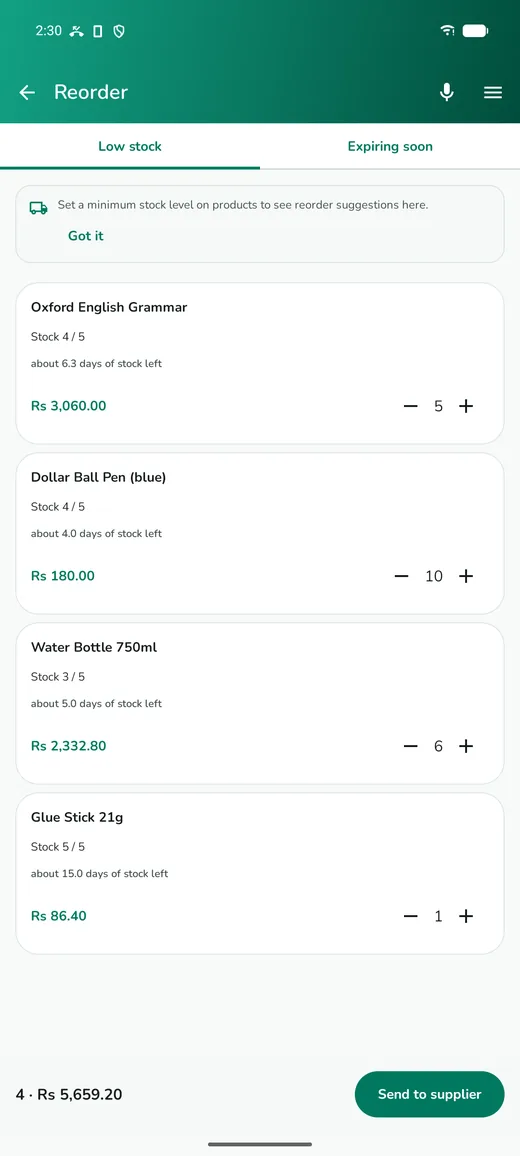
Reorder lists everything below its minimum stock, so you are not scrolling the whole catalogue hunting for gaps. Tick what you want, and the app produces an order you can send to the supplier on WhatsApp.
This screen is only as useful as the minimums you set, which is why they are worth setting properly for the products that matter.
The forecast
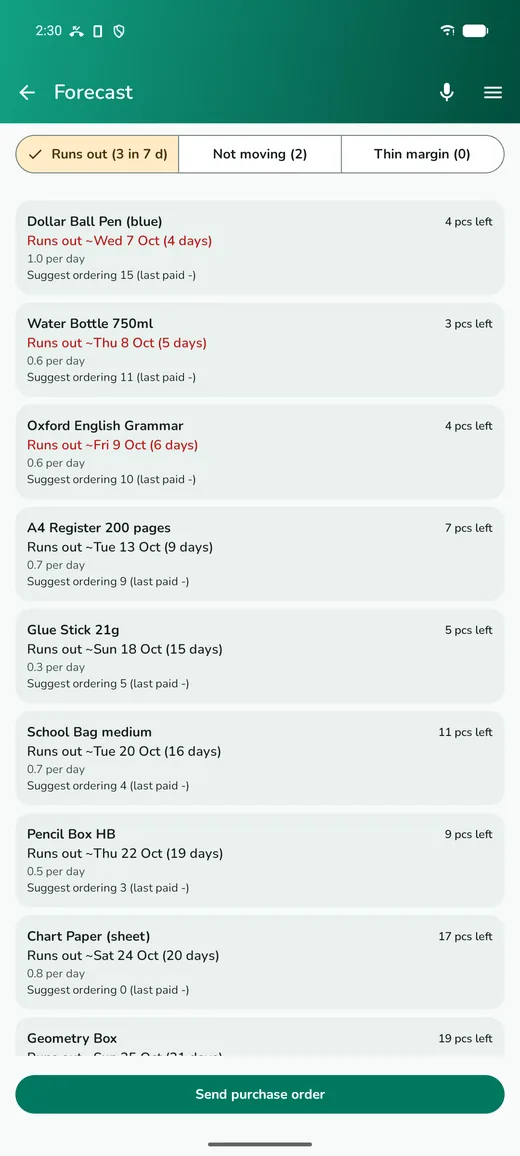
Forecast goes a step further and works out, from your own sales, how fast each product moves and roughly when it will finish. In the screenshot the app is saying that dish liquid sells about 0.8 a day, four are left, and it runs out in about five days.
It has three views:
- Runs out — sorted by how soon, with a suggested order quantity based on your sales rate and your minimum.
- Not moving — anything with no sale in ninety days. That is money sitting on a shelf, and it is usually a surprise.
- Thin margin — where your cost has crept up towards your selling price. Supplier prices rise quietly and nothing else tells you.
It is arithmetic on your records, not a crystal ball, and it is only as good as the sales you have actually entered. It is a Pro feature, which you can unlock for a day with credits or through the subscription.
Modules for particular shops
If you told the app what you sell, the product form already has the fields you need. If you did not, switch them on in Settings → Shop type & features:
- Pharmacy, grocery, bakery — batch numbers and expiry dates, with the app selling the oldest batch first and warning on expired stock.
- Mobile shop and electronics — serial numbers and warranty months, recorded against the sale so a warranty claim can be checked.
- Clothing — size and colour as variants of one product rather than dozens of separate ones.
- Restaurant — recipes, so selling a plate takes the ingredients off stock, plus modifiers and kitchen tickets.
- Wholesale — a second price and a bulk quantity that switches to it automatically.
Turn on only what you use. Every module adds fields to the product form, and a form with fields you never fill in is slower for everybody.
Questions
Should I add every product before I start selling?
No. Add your fast movers, then let the catalogue grow as you scan things at the counter. A shop's top twenty products are most of its sales.
How do I sell loose things like rice or vegetables?
Price them per kilo and mark them sold by weight. Trying to make loose goods into countable units makes your stock numbers fiction.
What if two products have the same barcode?
Treat one of them as unbarcoded and sell it by name, or print your own label for it. One code should mean exactly one product.
Can I delete the sample products?
Yes. A card at the top of the Products screen removes them all at once, and it disappears once they are gone.
Get Saleva
Free on Android. Selling, stock, customers and reports all work with no internet at all.